Your online booking page
Let brides book from your website: pick which appointments they can book, how far ahead, and whether you confirm first.
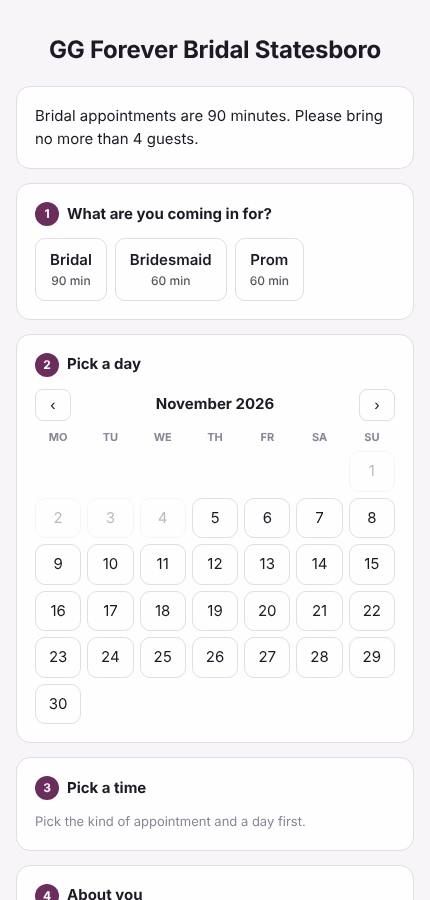
Your booking page shows brides the times when a fitting room is free and the store is open. Owners set it up.
Turn it on
- Open Settings and find Online booking.
- Tick Take bookings online.
- Choose the web address. It will be pos.bridaliq.app/book/ followed by the name you type (for example your store's name).
- Under When someone books, pick It's a request: we call to confirm, or It goes straight on the calendar.
- Set how far ahead (at least this many hours) and how far out (up to this many days) people can book.
- Write a short message for the top of the page, for example how long bridal appointments are and how many guests to bring.
- Tick the appointment types people can book, and press Save online booking.
Put it on your website
After saving, the card shows your page's address. Link a "Book an appointment" button on your website to it, or put the booking form right on a page of your site with the code from Your website (colors, Spanish, only some kinds of appointment, a short version, and steps to swap out the BridalLive code): see Your website.
What the bride fills in
She picks the kind of appointment, a day and a time, then gives her name, mobile phone, email, wedding or event date, how many guests are coming, her budget, how she heard about you, and anything you should know. The text-reminder box starts unticked: she gets text reminders only if she ticks it herself. The calendar shows only days the store is open, and the times are in the store's time zone.
Confirming requests
- Bookings made as requests show on Home under Booked online, and in the week view as online request.
- Call or text her to confirm.
- Press Confirmed next to her name.
Brides move or cancel their own appointment
Her confirmation and reminder, and her client page, carry a Move or cancel online link. It opens a page for that one appointment: she picks another open time (the same rules as booking: a room free, the store open, far enough ahead) or cancels. The change is on the calendar at once, you get a task on Home and an email, and she gets the usual confirmation. A canceled time goes back on the calendar.
- In Settings, find Brides change their own appointments (under Online booking). It is on to start with.
- Set how close to the appointment she can still change it. The default is 24 hours; closer than that, the page says Please call the store with your phone number.
- Only appointment types you opened for online booking can be moved online. Any can be canceled.
- If you wrote your own message wording, add
{change_link}where the link should go. To send the link yourself, open the appointment and press Copy her move/cancel link.