Customers, weddings and wedding parties
Keep every bride, her wedding date and her whole party together, with measurements, notes, purchases and messages on one page.
Find or add a customer
- Open Customers and search by name, phone or email.
- To add someone, press Add customer. Fill in her name, phone, email, customer type and consultant.
- Add her event (wedding, prom, quinceañera, homecoming, pageant or other), her role, the date and the venue.
- Add a second contact (mom, maid of honor, fiancé) to reach if she doesn't answer.
- Tick OK to text her only if she agreed to texts, and press Add customer.
Her page
Her page is in tabs so it is easy to find your way on a computer or a phone:
- Overview: how to reach her, her next appointment (with Reschedule), what she owes and getting ready for her visit.
- Purchases: her tickets, store credit, payments and alterations.
- Appointments: coming and past, each coming one with Reschedule.
- Wedding parties: one line for each party she is in (she can be in two); click it to open the party. Below, Change the people, their parts and tuxes opens the full party cards.
- Messages: write to her and see every email and text.
- Notes & history: measurements, interview, favorites, signed policies and anything else.
The buttons at the top start a special order, a sale or an alteration, add a note, or book an appointment. When you open someone from a wedding party, Purchases opens first and shows only what is for that party; press Show all her purchases for the rest.
Everyone in a party is a customer of their own
A groomsman or bridesmaid added to a party is a full customer: search finds them by name, they can buy things outside the party, be in two parties, and stay a customer after the wedding. If you type a whole name and nobody matches (a groomsman with a different last name), the list shows close matches.
Text and email
On her Messages tab pick Email, Text or Text and email. Text and email sends both at once, but only on the ways she said yes to; the box says which one was skipped and why.
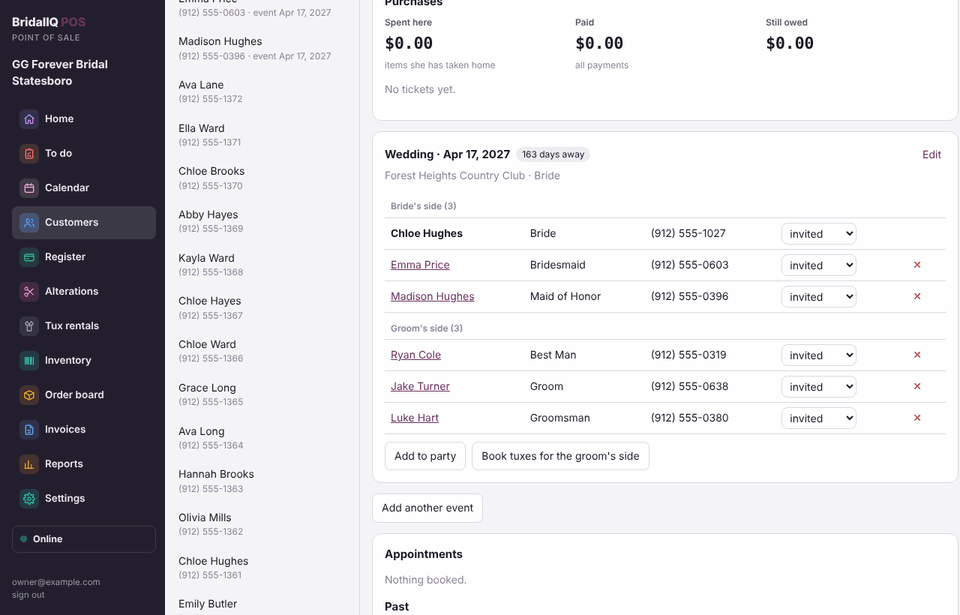
Build the wedding party
- On the bride's page, find her wedding card (or press Add wedding or event).
- Press Add to party, pick the role (Bridesmaid, Groomsman, Mother of the Bride...), then search for an existing customer or type someone new.
- Keep adding people, then press Done. People in groom's-side roles (groom, best man, groomsmen, ushers, the groom's parents) go on the groom's side by themselves.
- Change each person's status as things happen: Added, nothing ordered yet, measured, ordered, paid, received, picked up, returned.
- Use Edit on the wedding card to change the date or venue, or set a need everything by date.
Every person in the party is a customer with her own page; click a name to open it. Taking someone out of the party keeps her customer record. When the groom's side is in, Book tuxes for the groom’s side sets up their tux rentals.
Measurements and notes
- Press Add measurements and switch between Dress and Tux / suit. The newest set shows on her page.
- Press Add note to add to her notes without retyping them. Notes work offline too.
Duplicates
Managers see a Duplicates button on the Customers list. It finds customers with the same email, phone or name. Compare two, then Merge: everything moves to the one you keep, the other is kept in the history, and the merge can be undone from her page.
See Wedding parties for the list of parties, order deadlines and the party's QR code.